Subcontractor Portal · free for up to 6 users

Your team, your credentials, every site. Sorted.

Manage your engineers, their roles and every company and engineer credential in one place, on your own. When a main contractor on Sync brings you onto a project, link up for shared documents, inductions and site check-in.

Sign up free See every feature
Free for up to 6 users Works without a main contractor iOS and Android app
Been asked to use Sync by a main contractor?

Follow the step-by-step guide to create your account, share your linking code and get your team site-ready.

Read the getting started guide
Everything in the portal

Useful from day one, even on your own

You do not need a main contractor on Sync to get value from it. Run your team and your compliance in the portal, and switch on the project features whenever a contractor links you.

Works on its own With a main contractor
Part 1

Run your own team, with or without a contractor

Everything in this part works the day you sign up. No spreadsheets of ticket expiry dates, no folders of scanned cards, no hunting for the insurance certificate when someone asks.

Users and engineers

Your whole crew on one list

Add the people who manage the portal as users, with a role and permissions you control, and add the people who go to site as engineers. One person can be both. Each engineer shows straight away as valid, action required or expired.

Admin or group member roles, with permissions by area
Tick one box to make a user an engineer too
See who needs attention before they are booked on a job
How to add users and engineers
app.syncsoftware.uk/engineers
Dashboard
Projects
Credentials
Engineers
Health & Safety
Account
Config Settings
Profile
Help
Engineers
Manage engineers linked to your company. Credential completeness will appear here once available.
Showing 4 of 4 results
NameEmailEngineer roleCredentials statusActions
Anthony Kennedy [email protected] Apprentice Expired EditSee credentialsShare credentials|Get QR
Bob Riley [email protected] Electrician Action required EditSee credentialsShare credentials|Get QR
Priya Nair [email protected] Electrical supervisor Valid EditSee credentialsShare credentials|Get QR
Mark Hollis [email protected] Commissioning engineer Valid EditSee credentialsShare credentials|Get QR
20 per page
Share credentials
Send a QR to prove compliance
Roles and required credentials

Set what each role needs, once

Build your own engineer roles, from apprentice to supervisor, and assign the credentials each one requires from your own list of credential types. Sync then checks every engineer against their role, and marks anything else as not required.

Your own roles, named the way your business works
Required credentials assigned per role
Add the cards, tickets and training types you use
How to set up roles and credentials
app.syncsoftware.uk/config/engineer-roles
Dashboard
Projects
Credentials
Engineers
Health & Safety
Account
Config Settings
Profile
Help
Back to engineers
Engineer Roles
Add Option
Option NameStatusRequired CredentialsEditAssign/Unassign Required credentials
Admin Active Yes permanent Edit assigned credentials
Apprentice Active Yes permanent Edit assigned credentials
Commissioning engineer Active Yes Edit Edit assigned credentials
Contracts manager Active Yes Edit Edit assigned credentials
Electrical supervisor Active Yes permanent Edit assigned credentials
Electrician Active Yes Edit Edit assigned credentials
Ground workers / landscapers Active Yes Edit Edit assigned credentials
Required per role
Checked for every engineer
Company and engineer credentials

Every certificate, in date and to hand

Upload each credential once with its expiry date and the document attached. Company credentials, like insurance and policies, sit alongside every engineer's cards and training, so you can see what is valid, expiring or expired at a glance.

Insurance, policies and accreditations at company level
Cards, tickets and training for each engineer
Share an engineer's credentials, or show their QR code, to prove compliance
How credential management works
app.syncsoftware.uk/credentials/company
Dashboard
Projects
Credentials
Engineers
Health & Safety
Account
Config Settings
Profile
Help
Credentials
Company Credentials
View and manage company credentials.
NameExpiry dateStatus
Public liability insurance 31/03/2027 Up to date
Employer's liability insurance 31/03/2027 Up to date
Asbestos awareness training 10/07/2026 Up to date
ISO 9001 certification 18/09/2026 Expiring soon
Health & safety policy 01/01/2027 Up to date
Add credential
Credential name *
Select
Expiry date
Attach file
Select files or drag and drop to upload
Select files for upload
Save changes
Proof of compliance
Insurance & policies
The Sync mobile app

Your credentials, in your pocket

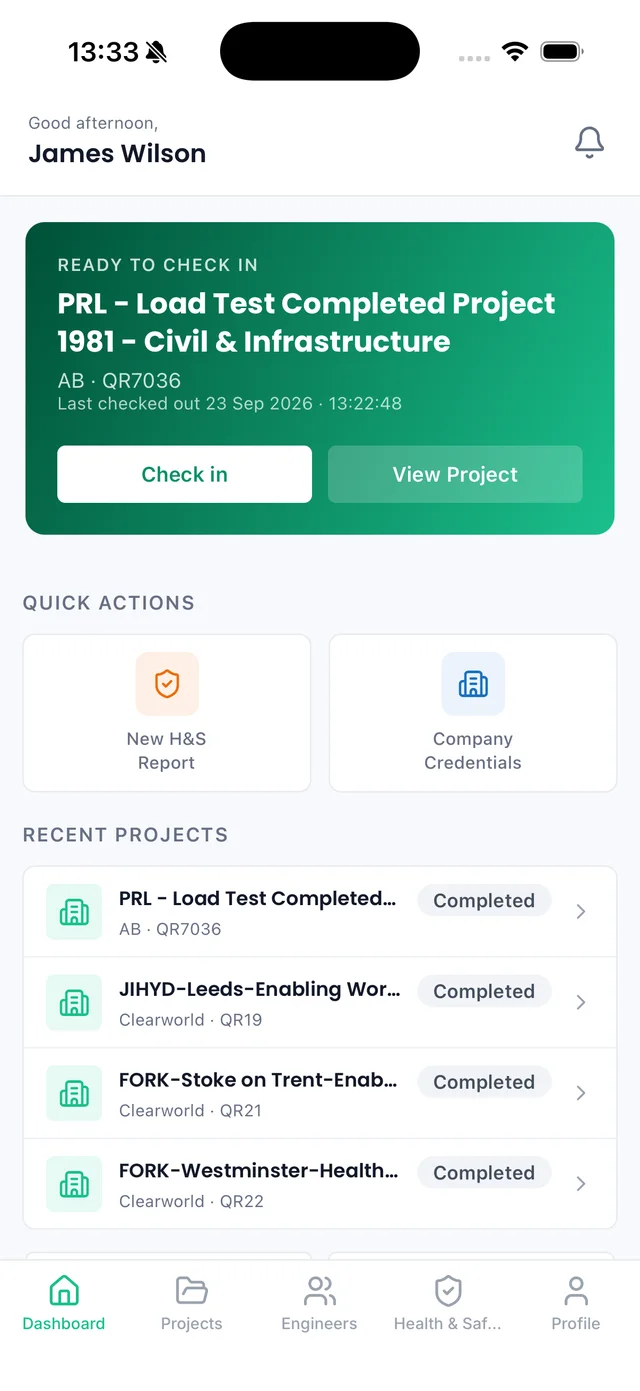
Every engineer can see their own credentials and show their QR code on the gate. When you are linked to a contractor, the project you are due on sits at the top, ready to check in.
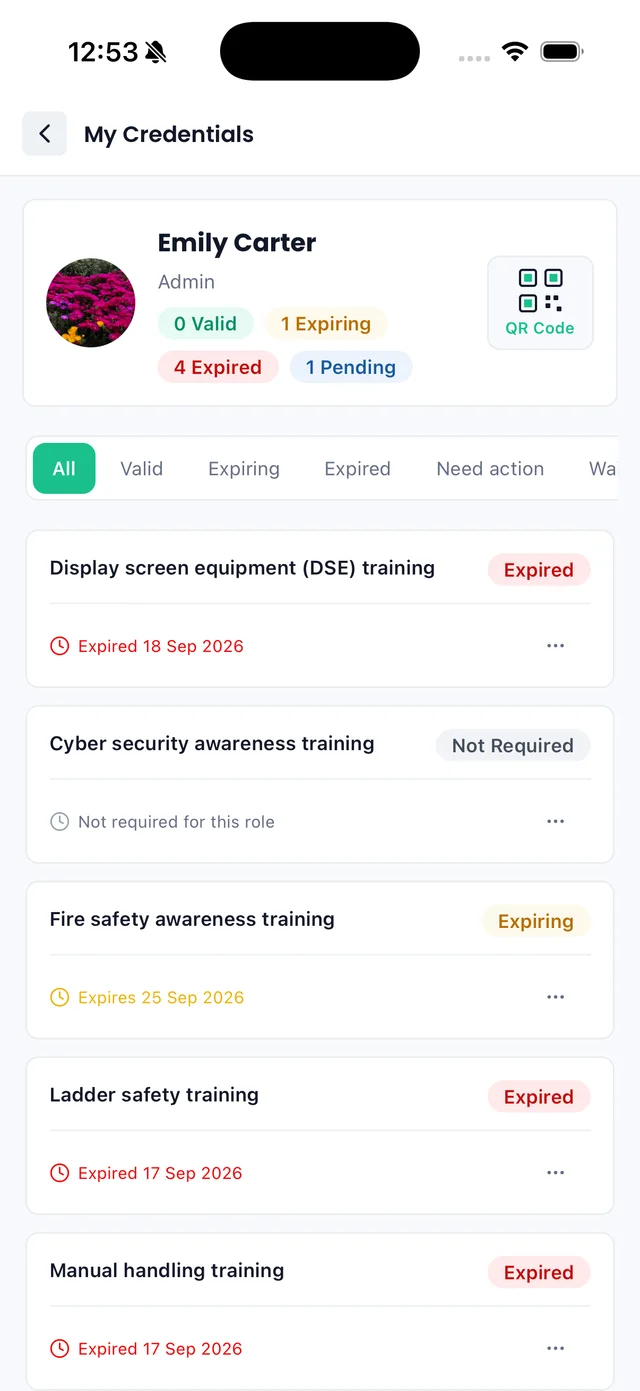
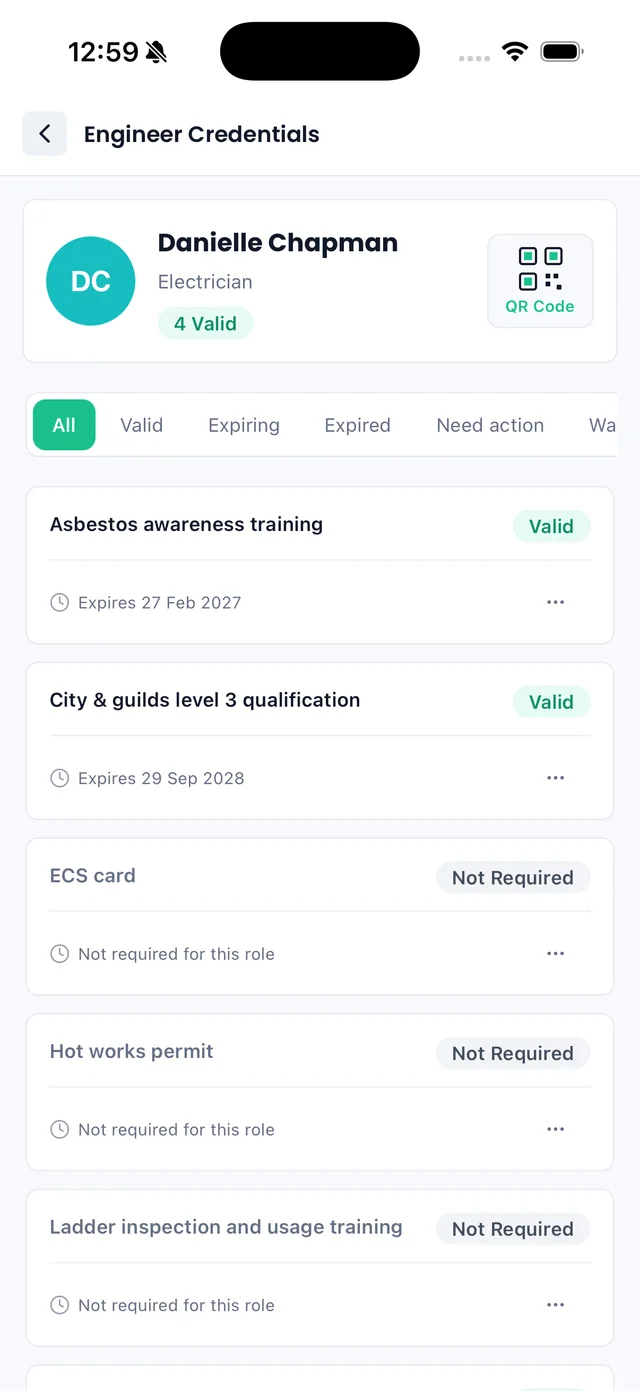
Sync iOS app: My Credentials with valid, expiring and expired counts
My credentials
Valid, expiring and expired at a glance
Sync iOS app: an engineer credentials page with a QR code and each credential status
QR code on the gate
Proof of compliance in seconds
Sync iOS app: subcontractor dashboard with a Ready to check in project card
Ready to check in
Today's project, one tap away
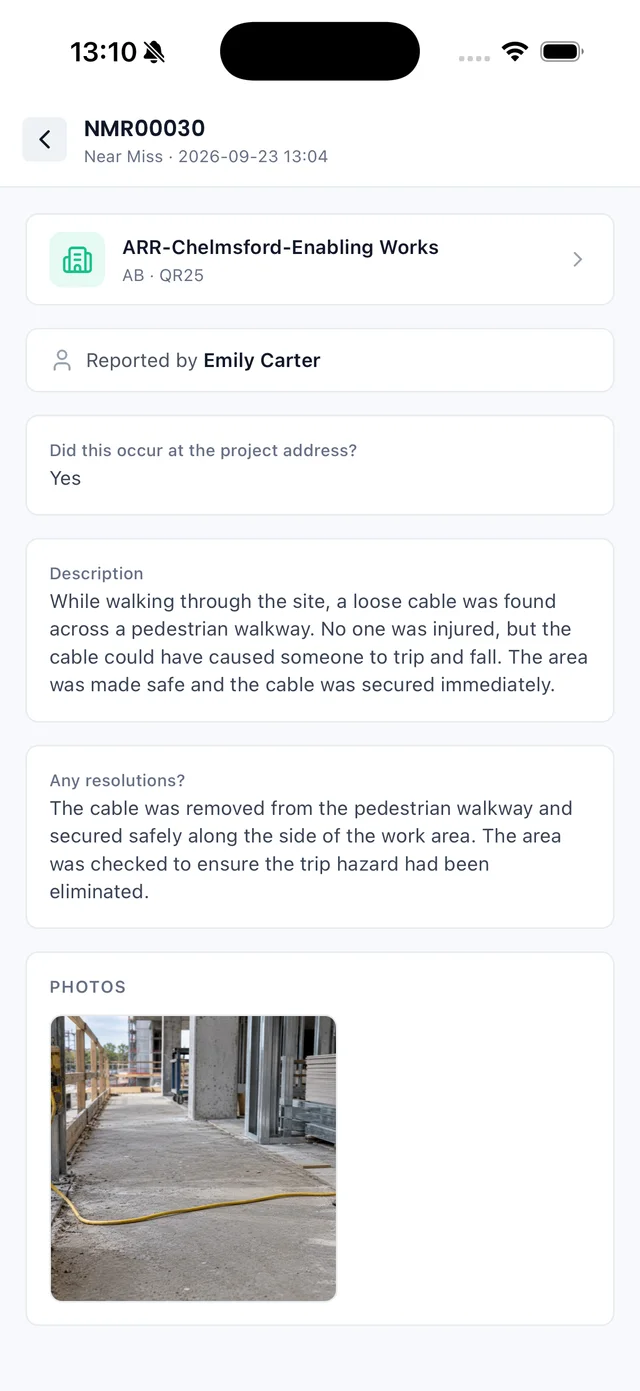
Sync iOS app: a near miss report with description, resolution and photo
Report a near miss
With photos, from site
Part 2

Link up with your main contractors

Send your linking code to a main contractor on Sync and the projects they share with you appear in your portal, alongside the team and credentials you already manage.

Link to as many contractors as you work for from the same account. Instead of digging through emails or waiting for someone to resend the latest file, you see the project information they share with you, and your credentials are already there for them to check.

app.syncsoftware.uk/projects/drawings
Projects
SFO - Manchester - Procurement & Supply Chain
Add retrospective log Log time
Log entriesSummaryProject DocumentsDrawingsTasks and commentsSite induction
Drawings
Status Created/updated Uploaded by Name Comment File
Pending 22/06/2026 Ava Palmer GA-100 Ground Floor Ground floor GA - issued for construction. 0 files attached
Pending 22/06/2026 Ava Palmer SO-200 Setting Out Setting-out revised, please work to this. 0 files attached
Pending 22/06/2026 Ava Palmer RF-300 Roof Plan Roof plan Rev C issued for comment. 0 files attached
Pending 22/06/2026 Liam Foster ME-410 Services M&E coordination markup added. 0 files attached
Pending 22/06/2026 Ava Palmer SE-520 Sections Section details updated to latest. 0 files attached
Latest drawings
Always the current rev
Shared to your team
No email chasing
portal.syncsoftware.uk/dashboard
Subcontractor Portal
You are logging time
Project: HQCK-Colchester-Design & Planning
Started at: 07:58 07/07/2026
Time spent on site: 00:36:22
Sign Out
Today's entries
Showing 3 of 3 results
Sign In Sign Out Total Time User Contractor Project
07/07/2026 07:58 Currently signed in - Daniel Reed Calder Electrical HQCK-Colchester-Design & Planning
07/07/2026 06:30 07/07/2026 14:45 08:15 Sarah Nolan Calder Electrical SFO-Manchester-Procurement & Supply Chain
06/07/2026 07:15 06/07/2026 16:20 09:05 Tom Beckett Calder Electrical HVF-Bristol-Enabling Works
On site right now
Time logged live
Who is where
Across every project
app.syncsoftware.uk/projects/site-induction
Projects
SFO - Manchester - Procurement & Supply Chain
Add retrospective log Log time
Log entriesSummaryProject DocumentsDrawingsTasks and commentsSite induction
Site induction
AB · QR44
INDUCTION REQUIRED
A new version of the site induction is available. Please complete the updated induction before working on this project.
Redo site induction
Name Company Version Completed Score QR scanned
Caitlin Robertson Calder Electrical v4 06/07/2026 100 Passed Yes
Daniel Reed Calder Electrical v3 03/07/2026 92 Passed Yes
Induction required
Before you reach site
Cleared to work
Scored & QR-verified
Site-ready early
Inductions done before site
Who is on site
Live, by project
Latest documents
Shared by the contractor
What linking adds

Ready for site, and on top of the work

The main contractor runs the project. Your team gets a simpler way to stay ready, compliant and informed.

Projects can only be shared by a main contractor already using Sync. Shared projects are mostly view only for now.
How to find and share your linking code
See every project you are linked to, across all your main contractors.
Open the summary, project documents and the latest drawings.
Complete site inductions before you arrive.
Check in and out on site, with your time logged.
Report a near miss or incident from the portal or your phone.
Keep company and engineer credentials current for every contractor at once.
Site inductions

Turn up cleared for site, every time

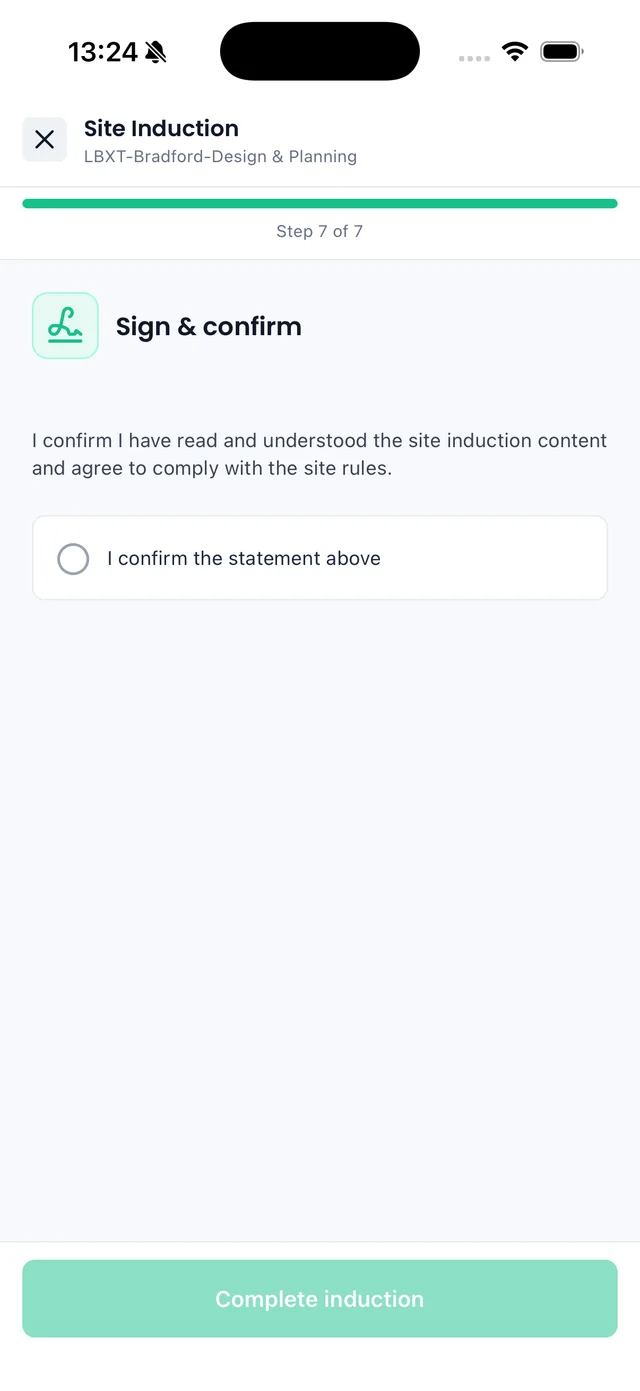
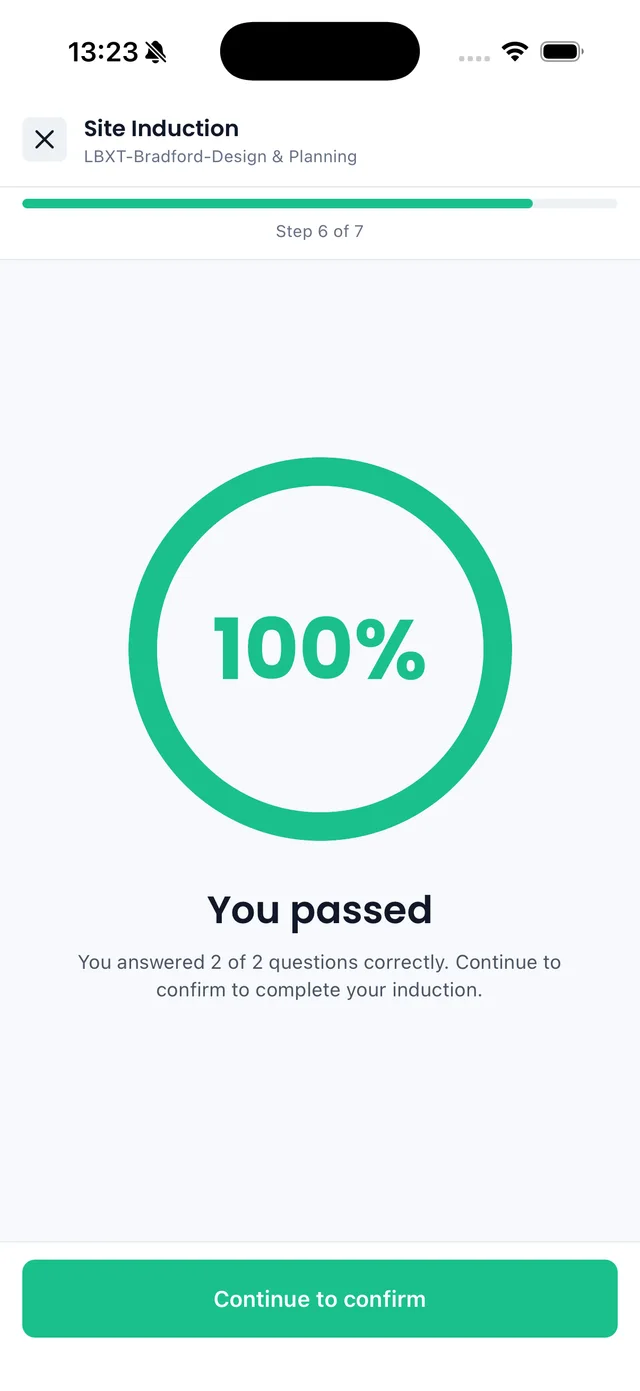
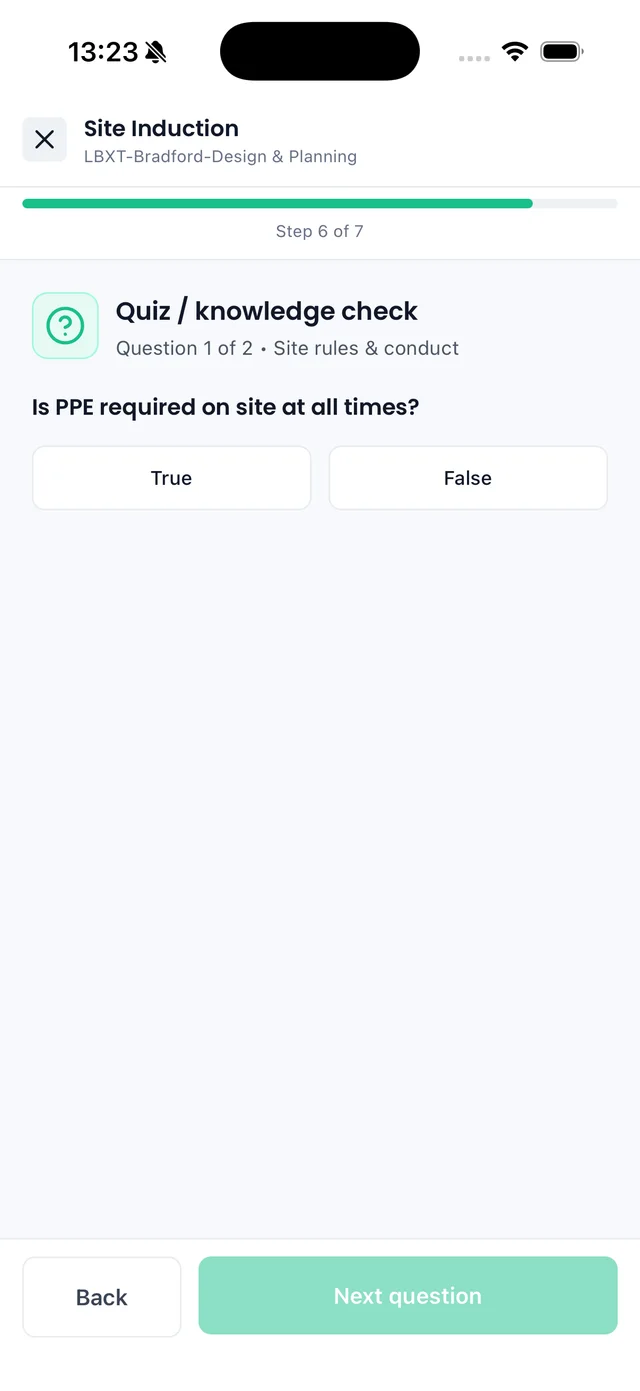
Read the site information, answer the knowledge check and sign, all before you set off. Pass, and you are cleared to check in. No gate-hut scramble, no wasted hours.
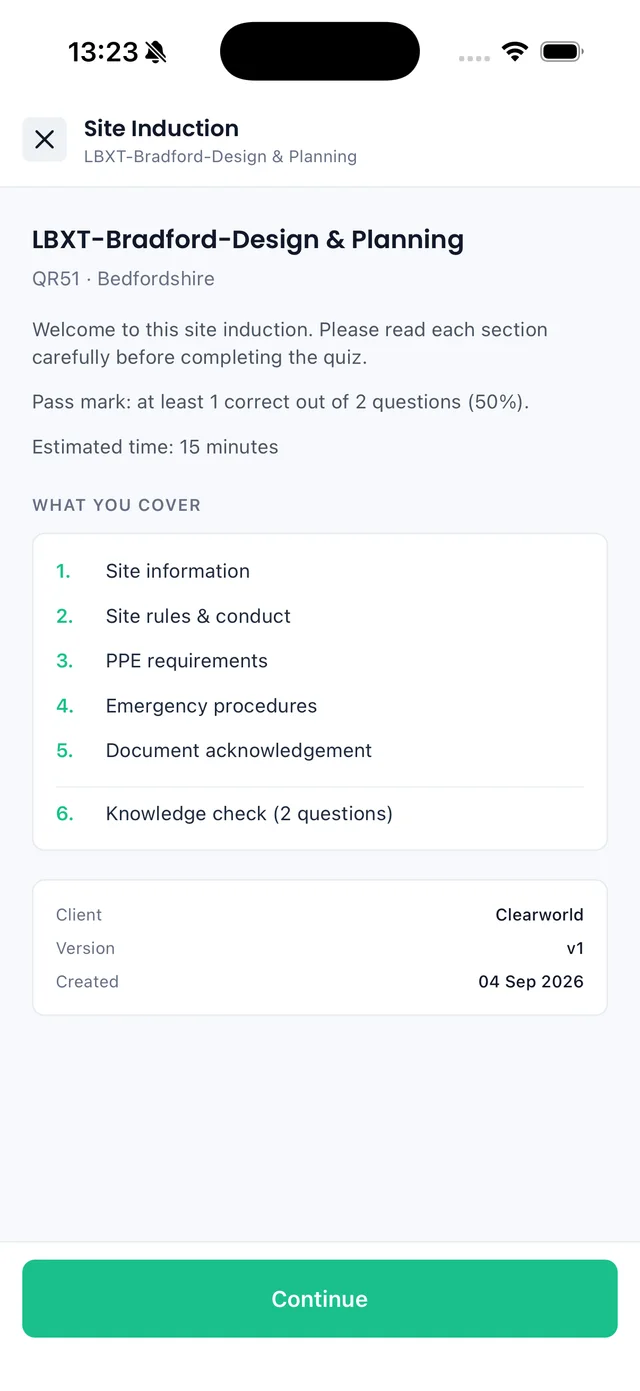
Sync iOS app: site induction overview listing the sections to cover and the pass mark
1Open the induction
See what it covers and the pass mark
Sync iOS app: site induction knowledge check question on PPE
2Answer the quiz
A quick knowledge check on site rules
Sync iOS app: site induction sign and confirm step
3Sign and confirm
Agree to comply with the site rules
Sync iOS app: site induction result showing 100% and You passed
4See your result
Know straight away if you passed
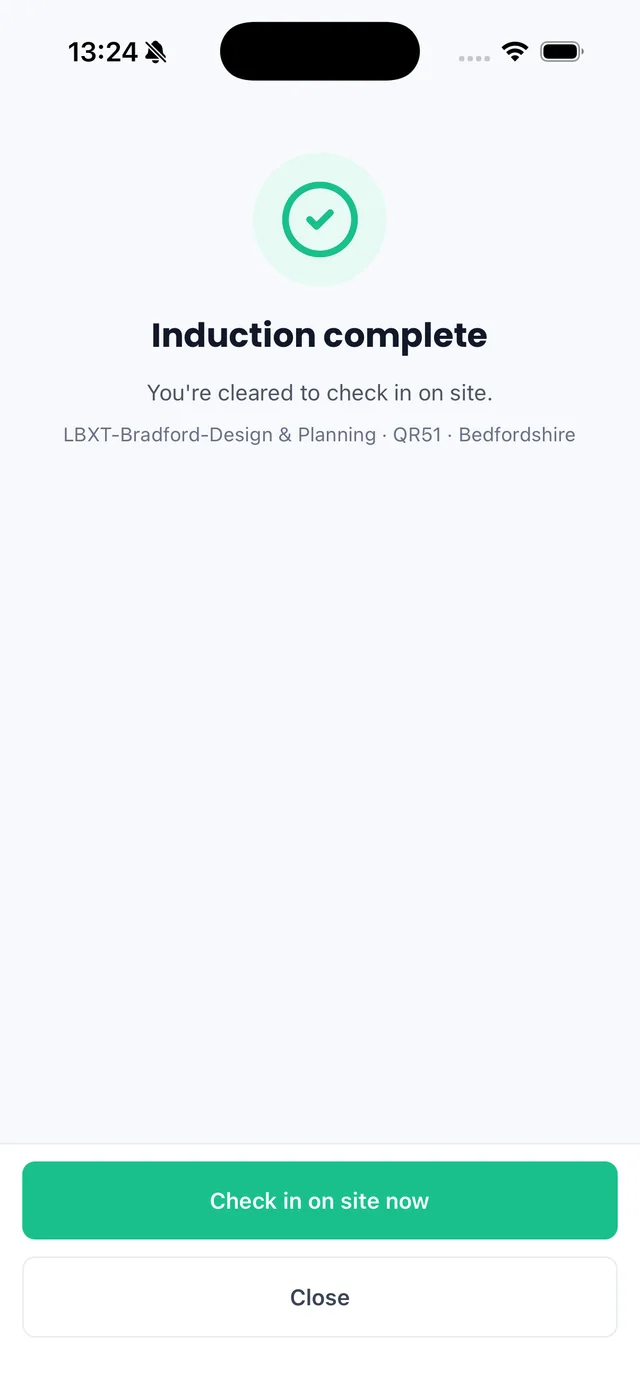
Sync iOS app: induction complete with a Check in on site now button
5Check in on site
Cleared, with one tap to check in
Digital site check-in

Check in, check out, time logged

Log time on site with a digital check-in and check-out, from the portal or your phone. Every entry records sign in and out times, total time on site and any notes, so there is one clean record for each project.

Sign in and out times, with total time on site
Add a retrospective log if someone forgot, clearly marked
Your sign-in sheet, shared with the main contractor
How to work on a shared project
app.syncsoftware.uk/projects/hqck/log-entries
Dashboard
Projects
Credentials
Engineers
Health & Safety
Account
Config Settings
Profile
Help
Projects
HQCK-Colchester-Design & Planning
Add retrospective log Log time
Log entriesSummaryProject DocumentsDrawingsTasks and commentsSite induction
Select
Showing 4 of 4 results
Sign InSign OutTotal TimeRetrospectiveSign In NoteSign Out NoteActions
07/07/2026 06:58 Currently signed in - No On site, ground floor — Delete
06/07/2026 07:02 06/07/2026 16:34 9:32:00 No First fix Left site Delete
05/07/2026 07:10 05/07/2026 15:58 8:48:00 No — — Delete
04/07/2026 07:05 04/07/2026 16:12 9:07:00 Yes Added retrospectively — Delete
Log time
Digital site check in and out
Health and safety

Report it from site, in a few steps

Where your main contractor has it enabled, raise health and safety reports straight from your portal or the app: choose the type and the project, add the location and the detail, and attach photos. Complete any audits they make available to you, in the same place.

Near miss, accident and incident reports
Site observations and follow-up actions
Audits completed in Sync when your contractor sets them
app.syncsoftware.uk/health-safety/report/create
Dashboard
Projects
Credentials
Engineers
Health & Safety
Account
Config Settings
Profile
Help
Report details › Description › Additional details
Create H&S Report
Next ›
Report details
HQCK-Colchester-Design & Planning
Near miss
07/07/2026
Bob Riley
Location
30 Ross Court
Colchester
Essex
CO2 8JX
Report a near miss
Shared with the contractor
No chasing, either way

What your main contractor sees

What you complete on a shared project flows back to the contractor, and to their customer where the project is shared with them. Your compliance is proven without another email.

Completed site inductions

Who has done the current version, when, and their score.

Site check-ins and sign-in sheets

Sign in and out times, time on site and any notes.

Health and safety reports

Near misses and other reports raised against the project.

Simple pricing

Free to start, room to grow

The full Subcontractor Portal is free for up to 6 users. Growing? Step up to Professional with a 30-day free trial.

Free
£0

For sole traders and smaller subcontractors.

Up to 6 users
Full Subcontractor Portal
Invite engineers
Limited storage
Standard support
Start free
Enterprise
Let's talk

For organisations with more than 25 users.

Unlimited users
Custom storage
Priority support
Bespoke onboarding
Contact sales

Compare every plan on the pricing page

Frequently asked questions

No. You can use the portal on its own to manage your users, engineers, engineer roles and the company and engineer credentials you hold, with expiry dates and documents in one place. Linking to a main contractor on Sync adds their shared projects, site inductions, digital site check-in and health and safety reporting on top.

It is free for up to 6 users. Professional covers up to 25 users with unlimited projects and more storage, with a 30-day free trial. Enterprise is for teams of more than 25 users. See the pricing page for current prices.

Users log in and help manage your portal, with a role and permissions you set. Engineers are the people whose credentials you track and who attend site. One person can be both: tick "Is this user an engineer?" when you create them.

Yes. In Config Settings you set up your engineer roles and assign the credentials each role requires, from your own list of credential types. Each engineer then shows as valid, action required or expired against the role they hold.

Copy the linking code from Account, Linked Portals and send it to the main contractor. Once they link you and share a project, it appears under your projects. You can be linked to more than one main contractor from the same account.

Projects are created and shared by main contractors already using Sync. Check that the project has been shared with your company, that you sent the right linking code from the right account, and that your user has permission to view projects.

Yes. Sync is on iOS and Android. Check in to the project you are due on, complete site inductions, view your credentials and QR code, and report a near miss with photos from your phone.

Running the main contract?

When your subcontractors keep their own credentials current in the portal, your whole supply chain stays compliant, and you can prove it in seconds.

Sync for main contractors
Trusted by construction teams across the UK
CinqueAB GroupClearworldDH Glazing & RepairsMC Contract ServicesCinqueAB GroupClearworldDH Glazing & RepairsMC Contract Services

Get your team set up in minutes

Add your engineers and credentials today, free for up to 6 users. Link to your main contractors whenever they bring you onto a project.

Sign up free Book a demo

Just need jobs, quotes and invoices? See Sync Lite

Related terms
CSCS cardSite inductionRAMSMethod statementNear missRIDDOR
Browse the Construction Library →